UiPath Coded Agents: Build AI Agents with Claude, Gemini & GPT
UiPath coded agents let developers build AI agents in Python using Claude, Gemini, or OpenAI. Here's what they are, how to install them, and why they matter.

🚨 Plot Twist: Your RPA Robot Now Has a Code Editor
Okay, picture this. For years, UiPath was the friendly drag-and-drop world — flowcharts, activities, "click here, then click there." Great for business users. A little claustrophobic if you're a developer who actually wants to write code and wire it up to a frontier LLM.
Then UiPath quietly flipped a switch: coded agents. Instead of building inside a low-code canvas, developers now write actual Python, in their own IDE, using a UiPath SDK — and that code can call Claude, Gemini, or GPT directly, then deploy straight into the same governed Orchestrator that runs your enterprise automations.
And then it got weirder (in a good way). UiPath went a step further with UiPath for Coding Agents — opening up its entire orchestration layer so that Claude Code, OpenAI Codex, Gemini CLI, Cursor, or GitHub Copilot can build, test, package, and deploy automations for you, right from your terminal while bringing Claude Code, OpenAI Codex, Google Gemini CLI, Cursor, or any coding agent on UiPath.
So yes — your automation platform now has two AI layers stacked on top of each other: agents that use LLMs, and coding agents that build those agents. Confusing? A little. Worth understanding? Absolutely. Let's unpack it properly.
🧩 So What Exactly Is a UiPath Coded Agent?
Here's the simplest way to think about it. UiPath now ships two flavours of agent:
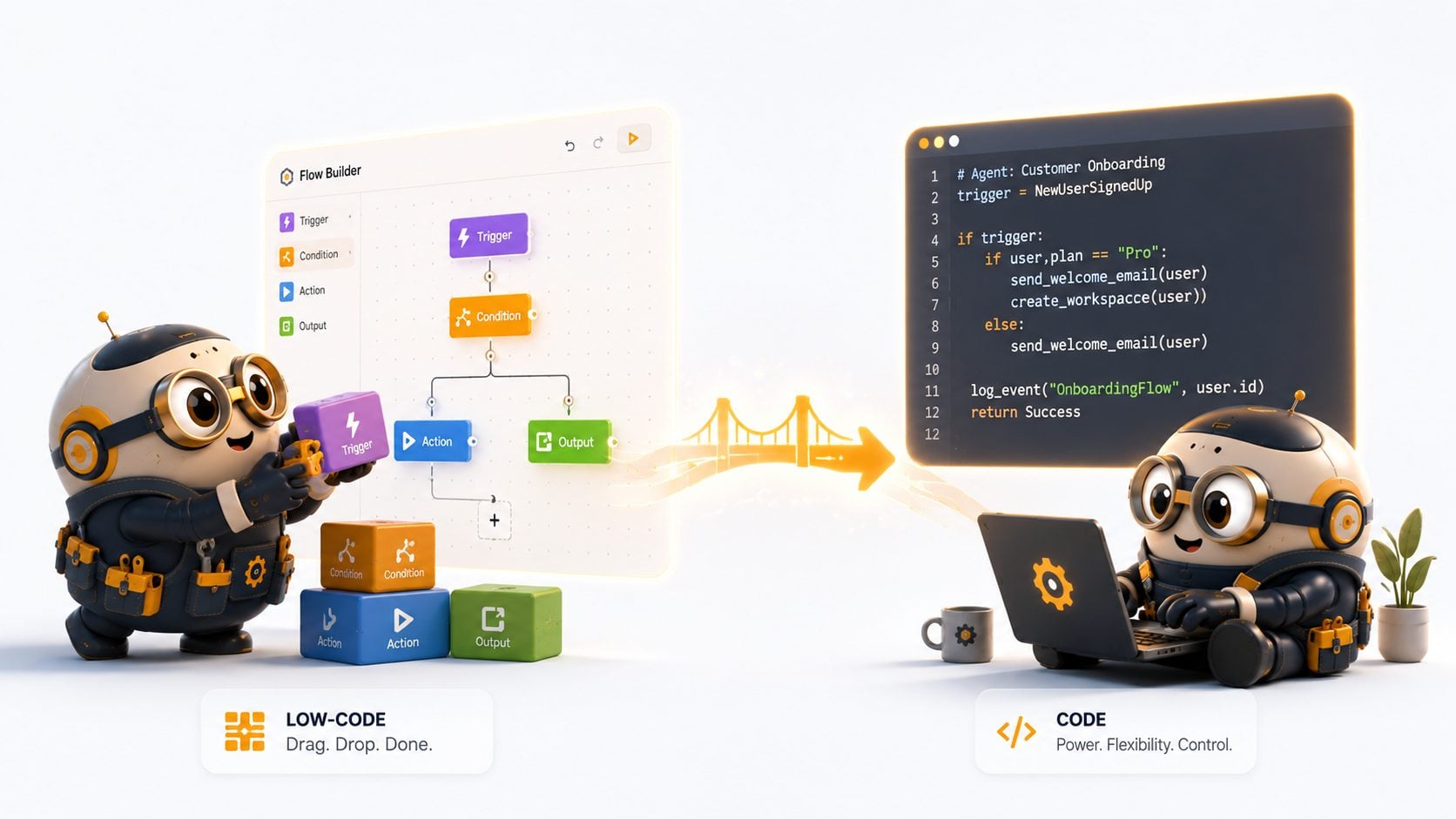
UiPath-built agents — created visually in the Agent Builder canvas inside Studio Web. This low-code development application enables business users and citizen developers to create powerful agents with minimal traditional coding expertise.
UiPath coded agents — developed by coding experts using UiPath SDKs within their preferred integrated development environment, then packaged and published to the UiPath ecosystem, where they run on Automation Cloud Robots – Serverless infrastructure.
The coded route trades the drag-and-drop canvas for the flexibility and power of custom code, allowing for highly tailored automations with complex logic — while still plugging into Orchestrator for management, scheduling, and monitoring, and leveraging the full spectrum of UiPath resources, including activities, other agents, apps, tasks, and Maestro for business process orchestration.
The really nice part for builder teams: you're not locked into one or the other. An existing low-code agent built in Studio Web can be cloned as a coded agent, letting developers take full ownership of the implementation in their IDE while retaining access to the same platform capabilities. Start visual, graduate to code when the logic gets gnarly — without rebuilding from scratch.
Under the hood, every coded agent follows the same four-step lifecycle: defining the agent logic in an IDE, establishing a secure connection to UiPath, deploying the agent to Orchestrator, and executing the agent within the UiPath ecosystem. Once deployed, it adheres to the same governance principles as standard processes — meaning your security team doesn't need a new mental model just because a developer wrote Python instead of dragging activities.
📈 Why This Is Suddenly Everywhere
We're not imagining the timing here. Three things converged almost simultaneously:
Coding agents went mainstream. Eighty-four percent of developers use an AI coding agent or plan to — and for a lot of teams, that coding agent has become a dependable builder, not just an autocomplete tool.
Gartner says agents are now table stakes. Forty percent of enterprise applications will be integrated with task-specific AI agents by the end of 2026, up from less than 5% today. At the same time, only 17% of organisations have actually deployed AI agents to date, yet more than 60% expect to do so within two years — the gap between ambition and execution is wide open.
UiPath opened the front door. UiPath is now the first enterprise business orchestration and automation platform to open its orchestration layer to any coding agent, with initial support for Claude Code and OpenAI Codex, and additional coding agent integrations planned through 2026.
In other words: the demand for agents is exploding, most enterprises haven't shipped one yet, and the platform that already runs millions of automation processes just made it dramatically easier to plug a frontier LLM into that infrastructure. That's the gap coded agents are built to close.
🤔 Why Do We Even Need Coded Agents?
Fair question — Studio Web's drag-and-drop agent builder already works. So why bother with code?
Because complex logic gets ugly fast in a canvas. Conditional branching, retries, multi-step reasoning chains, custom data transformations, calling three different APIs before deciding what to do next — all of this is trivial in Python and painful as a flowchart.
Because your team already lives in an IDE. A coding agent in your IDE makes the whole experience faster and lets you see how it makes use of the agent skills the SDK pulls in. If your developers are already in VS Code with Copilot or Claude Code open, coded agents meet them where they work instead of pulling them into a browser canvas.
Because you want a real choice of LLM. By default, the quickstart agent uses UiPath LLM Gateway, which provides access to any LLM provider without requiring API keys — or you can configure your agent to connect directly to the LLM provider of your choice, such as Anthropic or OpenAI. That's not a small thing for regulated industries: it means you can route sensitive workloads through your own Anthropic, OpenAI, or Google account and contracts, rather than an opaque shared gateway.
Because governance shouldn't be the price of flexibility. Once integrated into the platform, a coded agent is deployed as a UiPath process within Orchestrator folders and adheres to the same governance principles as standard processes — same RBAC, same audit trail, same scheduling. You're not trading control for code.
🛠️ Setting Up Shop: Prerequisites & Installation, Step by Step
This is the part everyone actually wants — so let's get our hands dirty. Here's what you need before you write a single line of agent logic, based on UiPath's own getting-started documentation.
✅ Prerequisites
Python 3.11 or higher
pip or the uv package manager (UiPath recommends
uvfor speed)A UiPath Automation Cloud account with appropriate permissions
(Optional, if you want to bring your own model) an Anthropic, OpenAI, or Google API key — you can generate an Anthropic API key or an OpenAI API key directly from their respective consoles
🧱 Step 1 — Spin up a clean environment
bash
# Create a virtual environment pinned to Python 3.11
uv venv --python 3.11

# Activate it (macOS/Linux)
source .venv/bin/activate

# Activate it (Windows PowerShell)
.venv\Scripts\Activate.ps1
📦 Step 2 — Install the UiPath SDK
The base SDK gives you process, asset, bucket, and queue access. The LangChain flavour adds the scaffolding for building reasoning agents.
bash
# Core SDK
uv add uipath

# LangChain-flavoured SDK (recommended for LLM agents)
uv add uipath-langchain

# Verify it installed correctly
uipath -lv
🔐 Step 3 — Authenticate against UiPath Automation Cloud
bash
uipath authThis opens a browser window for login — pick your organisation in the browser and your tenant in the terminal when prompted. The CLI then creates a .env file with your credentials and access token. Your .env should now contain something like:
bash
UIPATH_URL=https://cloud.uipath.com/ACCOUNT_NAME/TENANT_NAME
UIPATH_ACCESS_TOKEN=YOUR_TOKEN_HERE

# Optional — only if bypassing the UiPath LLM Gateway
ANTHROPIC_API_KEY=your-anthropic-key
OPENAI_API_KEY=your-openai-key
GOOGLE_API_KEY=your-google-key
🏗️ Step 4 — Initialise, run, and ship
bash
# Scaffold the project from your agent graph definition
uipath init

# Run and debug locally
uipath run

# Package the project into a deployable .nupkg
uipath pack

# Publish to Orchestrator's package feed
uipath publish
The uipath pack command takes your code and packages it into the standard .nupkg format that UiPath uses for automation packages, and uipath publish uploads that package to Orchestrator's package feed — similar to publishing a workflow from UiPath Studio. Once published, your coded agent appears in Orchestrator as a regular package, ready to be scheduled, triggered, executed, and integrated into your broader automation projects.

That's it. No Studio install, no separate low-code project — just a Python project, a .env file, and four CLI commands standing between you and a production-deployed agent.
🚀 Claude, Gemini, GPT — Pick Your Co-Pilot (or All Three)
Here's where it gets fun. UiPath didn't just make coded agents use LLMs — it made the building process itself agent-driven, and it deliberately didn't pick a favourite model.
Bring Claude Code, OpenAI Codex, Google Gemini CLI, Cursor, or any coding agent to UiPath — build, test, deploy, and govern production-grade automations without leaving your terminal. The orchestration layer doesn't care which one you used. The orchestration layer is the constant — connecting into agents with observability, execution, and governance as the underpinning, regardless of the coding agent being used, or which developer last touched the code, as new models are released from Anthropic, OpenAI, Google, and other AI labs.
What does that mean in practice?
Claude Code can scaffold your
main.py, wire up the UiPath SDK calls, write the LangGraph nodes, and explain why it structured the agent the way it did.Gemini CLI can do the same from the terminal, particularly handy if your team is already standardised on Google's tooling.
OpenAI Codex rounds out the trio — UiPath for Coding Agents launched with initial support for Claude Code and OpenAI Codex, with additional integrations planned for 2026.
And it's not just code generation — it's code quality generation. Coding agents on UiPath can run local validation, unit tests, and workflow analyzer checks through the CLI, getting feedback they can iterate against instead of waiting on a human reviewer to catch structural issues. The UiPath CLI and open-source agent skills give any coding agent native fluency in UiPath — no new paradigm to learn, no vendor lock-in.
Translation for the boardroom: your developers keep using whichever AI assistant they already like (or whichever one your enterprise has licensed), and UiPath becomes the deployment, governance, and runtime layer underneath all of them.

⚠️ The Catch Nobody's Shouting About
Here's the "but here's the thing" moment. All of this capability arrives faster than most organisations' governance can absorb it.
Governance lags adoption. Business and IT are misaligned. Agentic AI is arriving before organisations are ready — and that's not unique to any one platform; it's the pattern across the industry. Locally, the regulatory ground is also shifting under everyone's feet: Malaysia's AI governance approach is expected to shift from voluntary guidance towards a binding framework with formal enforcement mechanisms by the end of 2026, and Malaysia's AI Governance Bill is not expected to reach Cabinet until mid-2026, with current guidelines remaining voluntary and non-binding.
The advice from one regional vendor exec, paraphrased: don't wait for the regulator to tell you how to run an AI agent that already touches production systems. Organisations need to define their own policies and guidelines for their own use cases — if everyone waits for government regulation, problems are going to happen before the first draft even arrives.
So: the technical barrier to building a coded agent that calls Claude or GPT-4 has basically disappeared. The governance barrier — who approved this agent, what data can it touch, what happens when it's wrong — has not. That gap is exactly where most "we built an agent in a weekend, now what" projects stall.
🏗️ How Symprio Builds With Coded Agents

This is where we come in — not as outside consultants pointing at slides, but as the team in the room writing the same main.py your engineers are writing. A few principles guide how we approach UiPath coded agent projects:
We start from your existing automations, not a blank canvas. Most clients already have UiPath processes running. The fastest path to value is often cloning an existing low-code agent into a coded agent and extending it — not starting from zero.
We pick the model deliberately, not by default. Whether an agent runs on Claude, Gemini, or GPT-4 should be a decision based on cost, latency, data residency, and reasoning style for that specific task — not whichever provider's logo was on the quickstart template.
We pair-build, then hand over. Our vibe coding-led product engineering approach means a Symprio engineer sits inside your team using Claude Code or Cursor alongside your developers — building the coded agent together, then transferring the architecture so your team owns it long-term. This is the adopt-and-build model: we don't disappear after go-live.
We wrap governance around the agent from day one. RBAC via Orchestrator folders, secret assets instead of hardcoded API keys, and audit trails that satisfy a PDPA-conscious compliance team — not bolted on after an audit flags it.
💡 What This Could Look Like in 90 Days
Within a 90-day engagement, this typically translates into deployments such as:
An SME onboarding agent that reads incoming documents, calls Claude for unstructured-data extraction, and raises an Action Center task only when confidence drops below threshold.
A claims intake co-pilot, coded against the UiPath SDK, that triages incoming claims using Gemini for classification and routes exceptions to a human reviewer.
An internal knowledge assistant, built as a coded agent with Context Grounding, that answers operations-manual questions using whichever LLM your data residency policy allows.
A finance reconciliation agent that uses GPT-4 for anomaly explanation, packaged with
uipath packand scheduled in Orchestrator alongside your existing nightly jobs.
None of these are moonshots. Each one is a coded agent, a chosen LLM, and a governance wrapper your security team already understands.
💬 Over to You
Where's your team on this?
Still running everything through the low-code agent canvas and hitting a wall with complex logic?
Already experimenting with Claude Code or Gemini CLI, but unsure how to plug that into a governed enterprise runtime?
Worried that "just let the coding agent build it" is one incident report away from a very awkward audit?
These are exactly the conversations we have with engineering leads every week.
📞 Let's Build Something Real
Stop letting the gap between "cool demo" and "production-governed agent" cap what your team can ship. It's time to co-build a coded agent that's actually deployable — sized to your stack, your LLM contracts, and your compliance reality.
👉 Explore our Vibe Coding & Co-Build services → 👉 Book a 30-minute discovery call → — no slide deck, just a shared screen and a terminal.
❓ Frequently Asked Questions
What is a UiPath coded agent?
A UiPath coded agent is an AI agent built by developers in Python (or another supported language) using UiPath SDKs, inside their own IDE, then packaged and deployed to UiPath Orchestrator — where it runs under the same governance as standard automation processes.
Do I need to know how to code to build a UiPath coded agent?
Yes — coded agents are aimed at developers comfortable working in an IDE with Python. Business users without coding experience should use Studio Web's low-code Agent Builder instead, or have an existing low-code agent cloned into code by a developer.
Can UiPath coded agents use Claude, Gemini, or OpenAI models?
Yes. By default, agents use the UiPath LLM Gateway (no API key needed), but you can configure a coded agent to connect directly to Anthropic, OpenAI, or Google by supplying the relevant API key as an environment variable.
What is UiPath for Coding Agents?
It's a separate but related capability: an orchestration layer that lets AI coding agents — Claude Code, OpenAI Codex, Gemini CLI, Cursor, GitHub Copilot — build, test, package, deploy, and govern UiPath automations directly from your terminal.
What are the prerequisites for building a UiPath coded agent?
Python 3.11 or higher, pip or uv, and a UiPath Automation Cloud account with appropriate permissions. Optionally, an API key from Anthropic, OpenAI, or Google if you want to bypass the default LLM Gateway.
Sources & Further Reading
UiPath Newsroom — Unlocking Enterprise Transformation at Scale With UiPath for Coding Agents
UiPath Developers — Enterprise Automation Platform for Coding Agents
UiPath Community Blog — Build a UiPath coded agent without leaving your IDE
Gartner — 40% of Enterprise Apps Will Feature Task-Specific AI Agents by 2026
KPMG Malaysia — From Capacity to Capability: Malaysia's AI Governance Imperative
TechWire Asia — Malaysia Is Rushing Into AI Faster Than Anyone. Its Governance Gap Is the Price
#Symprio #BuildNotBuy #EnterpriseAI #AIAgents #UiPath #VibeCoding #AgenticAI #Malaysia
Symprio builds AI-enabled products with the same code your team will own tomorrow — co-built, governed, and shipped.